Friday, June 27, 2014

Week #6. GNM in GDAL 2.0

Take a look at my repo to see the source code with comments and methods description.

GNM API
(source code at <gdal root>/gnm)

In general the approach is like in one of my first posts, but now we have the API, which integrated into GDAL library (for the moment only in my fork of GDAL repo) and this API has a key change: it is no longer the OGR driver, not only because in GDAL 2.0 all migrates to GDAL drivers but also because of my concept which I described earlier. So now it is the separate set of classes.

Application
(source code in <gdal root>/apps/gnminfo.cpp)

This console utility is similar to those like gdalinfo.exe or ogrinfo.exe and was made to provide the use of several GNM API methods. Type this in command line:
>gnminfo.exe --long-usage
and you will see its usage:
Usage: gnminfo [--help-general] [-progress] [-quiet]
               [-create [-f format_name] [-t_srs srs_name] [-dsco NAME=VALUE]...]
               [-i]
               [-cp src_dataset_name] [-l layer_name]
               gnm_name

 -f format_name: output file format name, possible values are:
    [ESRI Shapefile]
 -progress: Display progress on terminal. Only works if input layers have the "fast feature count" capability
 -dsco NAME=VALUE: Dataset creation option (format specific)
 -cp src_datasource_name: Datasource to copy
 -l layer_name: Layer name in datasource (optional)
So with this utility you can now do the following. Note: we assume that the "connectivity" is a set of special system layers which store the network data (contrary to the set of layers with spatial data on which the connectivity though is based).

1. Create a connectivity:
>gnminfo.exe -create -f "ESRI Shapefile" -t_srs "EPSG:3857" -dsco "con_name=my_connectivity_1" ..\data\my_con
The connectivity will be created in the Shapefile format at the given path and with the passed parameters. Technically there will be created several system layers (in our case several .dbf files for Shapefile dataset).

2. Import layers with spatial data:
>gnminfo.exe -cp ..\data -l kolodci ..\data\my_con
>gnminfo.exe -cp ..\data -l lines ..\data\my_con
>gnminfo.exe -cp ..\data -l reshetki \..\data\my_con
These 3 layers will be copied with all features from an external dataset to a given connectivity with special names. The according changes will be made in system layers and also the system fields will be added to this data in order to maintain the work with future network.

3. Give an info about connectivity:
>gnminfo.exe -i ..\data\my_con
 The info will be printed:
Connectivity opened successfully at ..\data\my_con
1: _gnm_meta (None)
2: _gnm_graph (None)
3: _gnm_classes (None)
4: gnm_kolodci_point (Point)
5: gnm_lines_line (Line String)
6: gnm_reshetki_point (Point)

Connectivity metadata [Name=Value]:
    [common_srs=EPSG:3857]
    [gnm_version=1.0.0]
    [gfid_counter=1350]
    [con_name=my_connectivity_1]
SRS WKT:
PROJCS["WGS 84 / Pseudo-Mercator",
    GEOGCS["WGS 84",
        DATUM["WGS_1984",
    <... Additional info about SRS ...>
    AUTHORITY["EPSG","3857"]]
We see the system and simple layers, and also the contents of _gnm_meta - the network metadata.

The connect, disconnect, reconnect methods were not used in the gnminfo utility. If we want to make some connections in the created connectivity we can just call ConnectFeatures() and pass the global identifiers (which were set automatically when the layers were imported) to it. The graph layer (_gnm_graph) will be modified. As I planed my next steps will be to widen the GNM API and particularly to add an automatic graph building (so not to use ConnectFeatures() manually on the big sets of spatial data). Maybe I also make a similar utility to test this functionality.

Friday, June 20, 2014

Week #4 and #5

These two weeks were hard for me, because I had to spend additional time to prepare and defend my Master's thesis. Now it is successfully done and I fully concentrate on GSoC coding.
Nevertheless I have already done some important things:

* Made some main methods of a new GNM API: create and remove connectivity.
* Integrated it directly into GDAL 2.0dev (my fork https://github.com/MikhanGusev/gdal-svn/tree/cmake4gdal), built the library and tested with my old testing application, improving it a bit in order to use new GDAL 2.0.

So, according to my concept the following algorithm is actual for these methods just now:

Income: we have a set of spatial data. It can be void (without layers) or full of layers.
1. Initialize GDALDataset.
2. Create the GNMConnectivity over this dataset. The according system layers and fields will be created.
3. ... <here will be modifying, analysis and so on>
4. Remove the connectivity if it is necessary to restore an old "pure of network" dataset, so:
Outcome: we have the initial set of spatial data without any changes.

I continue to move old methods to the new API and to implement my concept.

Friday, June 6, 2014

Week #3. Some old methods completed

Some new methods have been added to an old API:
[commit]

* New decorator for connectivity behavior. It checks whether the features being connected have the according geometries: wkbPoint for source and target vertexes and wkbLine for edge. If this decorator hasn't been set any geometries must "lie under" the graph (even poligons).

* Delete feature method. Deletes the feature from data source, from the according system tables and from the graph.

* Remove edge, remove vertex methods. The removing methods of the graph.

All these methods will be moved to the new API in future.

Tuesday, May 27, 2014

Week #2. New GDAL networking API

In this post I would like to propose the final appearance of the new GDAL networking API.

I suppose, that implementing a network functionality as a GDAL driver has the following disadvantages:
  1. The concept of driver in general is to provide a "bridge" between GDAL abstraction and the real data format. There is no network format itself, because every vector format stores the network (or simply connectivity) together with spatial objects or in the separate set of layers but anyway the same format.
  2. An implementation of a new GDALDataset must be generic and implement only the defined interface, while we need to add new network functionality.We will need to do a type cast if we want to use network methods of the new GDALDataset.
  3. Network is usually built over the ready set of spatial data. In case of driver there is a need firstly to create a void network and then import some layers from external data sets.
  4. If we inherit the GDALDataset a lot of unnecessary for networks methods, such as working with rasters, will be inherited too.
  5. Some drivers, which serves as an "inner" for networking driver does not support several layers, such as GeoJSON, so there is no capability to create a network over them, while this requires several layers.
  6. I also suppose that some mechanisms of network model extensions, which I've implement in my driver are a bit excess and I think it is unnecessary to include it into GDAL library.
Solution

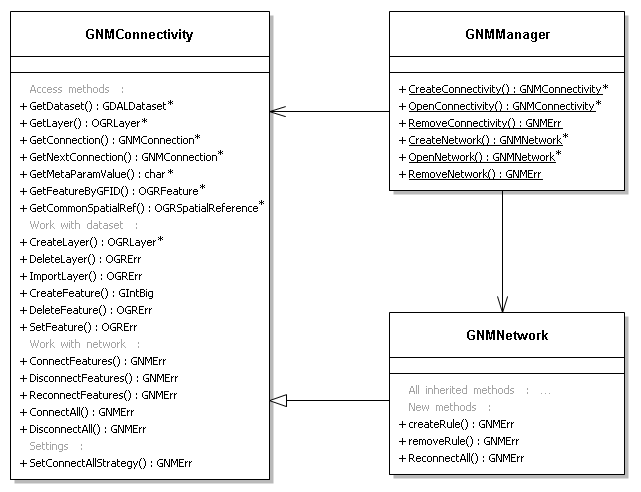
The separate class GNMConnectivity represents a network as an object and aggregates a GDALDataset instance, but not inherits it. The network data and spatial/attribute in fact are not separable (just additional layers or fields), while the GNMConnectivity "knows" which data from the data set refers to network data and operates it. The network can be built only over the existing data set (though, it can be void), wrapping it and adding missing network layers/field.

All network functionality in GDAL will be split to two levels: GNMConnectivity (level 0) and GNMNetwork (level 1). The 0 level represents a simple graph (simple connectivity or topology) which holds the connections among features. The level 1 is based on the level 0 and adds the support of network's business logic. For each level the default network functionality will be provided for any GDAL-supported vector format (at first actually for several), as it is now in my driver.


The derived classes intend to provide a support of native networking of different formats as an alternative to default. Some of these formats (like pgRouting or GML) have just connectivity capabilities without any business logic support, while others (Oracle Spatial, GDF or even ArcGIS networks) have the concept of network constraints (connectivity rules, turn restrictions). The main point is that GNMConnectivity / GNMNetwork provides the generic interface for these network formats, like GDAL provides the generic interface for spatial formats.

The derived classes also define how the network data stores in its format. For example for SpatiaLite VirtualNetwork the according "driver" will write all network data to the Roads_net_data table and to corresponding NodeFrom and NodeTo columns. If use of such "driver" hadn't been selected - the corresponding network_ layers in this simple SpatiaLite data set will be created (see my previous posts about how the network is stored). Another example: in the native form the GML "driver" will write network data to the <gml::TopoComplex>, <gml::Node> and <gml::Edge>.

API

This is a set of classes with public functions, which should be used:


Take a look at detailed description of classes, methods and its parameters:https://github.com/MikhanGusev/gnm/blob/master/gnm.h

C API: https://github.com/MikhanGusev/gnm/blob/master/gnm_api.h

network2network

The following code can be an example of using GDAL network API. It is a part of possible future utility network2network which converts the networks of different formats:

void main (void)
{
    //...
    // poPGDS initialized as a PostGIS Dataset. It has spatial data and connectivity
    // over it already.
    // poShpDS initialized as a Shapefile Dataset. It has all corresponding spatial data
    // (with the same GFIDs also), or the process of network copying will fail or be incorrect.

   
    GNMConnectivity *poPGCon = GNMManager::OpenConnectivity(poPGDS,TRUE);
    if (poPGCon == NULL) return;
    

    OGRSpatialReference *poSRS = poPGCon->GetCommonSpatialRef();
    GNMConnectivity *poShpCon =
GNMManager::CreateConnectivity(poShpDS,poSRS,NULL);
    if (poShpCon == NULL) return;
   
    GNMConnection *con;
    poPGCon->ResetReading();
    while ((con = poPGCon->GetNextConnection()) != NULL)
    {
        GNMErr err = poShpCon->ConnectFeatures(con->nSourceGFID,
                                               con->nTargetGFID
                                               con->nConnectorGFID
                                               con->dDirCost,
                                               con->dInvCost,
                                               con->dir);           
        delete con;
       
        if (err != GNMERR_NONE)
        {
            poShpCon->DisconnectAll();
            return;
        }
    }
   
    // The correct resources freeing.
    //...   

}


Friday, May 23, 2014

Week #1. Network's business logic

As I mentioned in one of my previous posts (http://gsoc2014gnm.blogspot.ru/2014/05/model-in-action-2-analyse-network.html) all this week I worked on network's business logic. The providing capabilities are similar, for example, to ArcGIS connectivity rules, but more general: http://resources.arcgis.com/en/help/main/10.1/#/na/002r0000000q000000/

All business logic of the network is based on the string-like rules. Each string describes the rule for the class (layer) or for the whole network. It is easy to set them and remove, while they are stored in a single non-geometry layer. When the OGRGnmDataSource::addRule() is called, this string is added to the network_rules layer and immediately built into the inner structures. The rules have an effect when the methods like OGRGnmDataSource:: connectFeatures() are called.

Now the rule syntax looks like the following (but it will be certainly widen in future):

CLASS <Class name> [COSTS <Attribute name>] 
[BEHAVES AS EMITTER | TRANSMITTER | RECEIVER]

NETWORK CONNECTS <Class name 1> WITH <Class name 2> [VIA  <Class name 3>]


[] means that these parts can be set separately in different strings;
| means that one of the operands can be used at the same time;

So, let's take a look at the example how to use rules.


// Code begins --------------------------------------------------------------------------

// Initialize the dataSrc as OGRGnmDataSource*.
// Import some layers: tanks, kolodci, lines, reshetki.
// The network is not created yet.

dataSrc->addRule("CLASS tanks BEHAVES AS EMITTER"); // String 1.
dataSrc->addRule("CLASS lines COSTS L"); // String 2.
dataSrc->addRule("NETWORK CONNECTS kolodci WITH kolodci VIA lines"); // String 3.
dataSrc->addRule("NETWORK CONNECTS tanks WITH kolodci"); // String 4.

// The inner rule structures will be built.
// Now, let's create a network.

dataSrc->connectFeatures(0, 1, -1, 0.0, 0.0); // 0 and 1 are GFIDs of the tanks layer.
// The result will be an error, while there is no connectivity rule between two features of tanks.

dataSrc->connectFeatures(145, 146, 5, 0.0, 0.0); // 145, 146 are kolodci features. 5 is lines feature.
// The corresponding record will be created in the network_graph, because of String 3.
// The costs of this connection will be the values of an "L" field of lines layer, because of String 2.

// Code ends ---------------------------------------------------------------------------


After that we can use a GNMSimpleNetworkAnalyser::resourceDestribution() method. It will firstly collect all source points (all tanks features) and create a connected component starting from them, because of a String 1.

Take a look at my github to see the source code: https://github.com/MikhanGusev/gnm

Sunday, May 18, 2014

Model's architecture

Current model's architecture is the following (with the description at the project's repository https://github.com/MikhanGusev/gnm/blob/master/description.md):


But it is also a question now, how this new API will look like in GDAL. There are several ideas:
1. Leave all as it is now - there will be an OGR driver with additional non-generic OGR behavior, such as connectFeatures() method.

2. Create a set of new C API like functions. For example OGR_GMN_DS_ConnectFeatures(hD
S, ...) where there is a user's responsibility to pass hDS as OGRGmnDataSource.

3. Similar to (2), but fully object-oriented approach is to create a separate class hierarchy (like OGRSFDriver - OGRDataSource - OGRLayer). It will require the initialized data source of the spatial format. For example:

OGRDataSource *poDS;
// initialization of poDS ...
OGRNetwork *poNetwork;
poNetwork = OGRNetwork::create(poDS); // or OGRNetwork::open(poDS)
//...
poNetwork->createFeatures(...);

4.Use pseudo-SQL functions passed through the OGRDataSource::ExecuteSQL() method. For example ExecuteSQL("SELECT connectFeatures(/*...*/)")

Wednesday, May 7, 2014

Model in action #2. Analyse network

In this post I would like to describe the current network analysis functionality of the GDAL/OGR network model. If you want to know how this all "technically" works you could take a look at the description document at my Github.

Shortest path search

The shortest path problem is the typical routing problem of the road networks. To define the shortest path between to points we will use the shortestPath(long startGfid, long endGfid, OGRLayer *resultLayer) method of the simplenetworkanalysis.h package (which for its turn uses Dijkstra shortest path tree search algorithm). Let's create a new network as at was shown at previous post, defining the Esri Shapfile as the spatial format now. Note: I made some preparations to visualize the results and save them at the QGIS project, which can be also found at my Github. For example, I set the "kolodci" layer's labeling options so the GFIDs of this layer features are displayed (using the joining with network_features layer).


When all features are added and connected we firstly create a new layer (also shape) which will serve as a holder of the resulting path. Let's find the shortest path between features with 801 and 807 GFIDs. We pass the new layer and these GFIDs to the shortestPath() and after the calculations the new layer will be filled with the geometries of a built path (displayed in red).


That was the simple task because there is no alternative path between 801 and 807. Let's create them. We connect 816 with 802 and 819 with 806 and use the method with the same parameters again. The new shortest path will be found. This path will lie through the connection between 816 and 802, because the costs of the network's edges were formed with the line lengths (see the previous post) and this path is definitely shorter. Note, that while the two new connections are "logical" there are no real geometries under them and so they can not be displayed.


Now let's try another interesting capability of the model - features blocking. We block the 815 feature and that means that it will not be considered in the following graph tracing, like it is now removed from the graph. So the previous path becomes unavailable and the shortest path will lie through 819 and 806.


If we block then 818 feature there will be no path between 807 and 801 and the according error code will be returned.

Resource distribution

In the field of engineering networks the resource can be anything that spreads over the network (water, gas, electricity) from the emitter features, along the transmitter features, to the receiver features. So there is a task to see, which part of network is covered by resource in different situations, such as blocking (breaking) of some network elements.

The concept of rules plays the key role in the work with resource. It is proposed that all features of the class, that marked as EMITTER will “emit” the resource. Thus the resourceDestribution() method of the simplenetworkanalysis.h package can use the connected component search algorithm (the concrete implementation is a Breadth-first search) to define which (line) features are connected to these emitters, that means that they have a resource. Let's open our previous network and make some preparations before the resource can be collected. 


We say that the three features from the layer “tanks” (marked as stars) will play the role of emitters. We connect them with the nearest features: 0 with 807, 2 with 721 and 1 with 717. Now let's create the resulting layer and pass it to the resourceDestribution(). This layer will be filled with the features, showing the resource spreading from the multiple emitters.


Let's imagine that some junctions in our water network are broken. We block 720 and 718 and see that though a small part of network has no water now, the most part of it still has it. 


To resolve this “problem” we can build a temporary pipe from any place where the water persists. We connect 721 with 719 and see that the void section is now full with water.


The rule syntax and its analysis is the subject that I'm working on now. In the code of resourceDestribution() I simply pass the GFIDs of the “emitters” instead of parse the rule string and use some inner structures. The rules itself are more useful and describe such things as cost assignment and allowing connections verification. So I suppose that my next steps will be the following: complete and debug all, that I have already, implement the rules support and make some good tests.